 Rail Train Visits Train Visits view Actions Recall Train Update Discharge hub form
Operations Rail Train Visits Train Visits view Actions Recall Train Update Discharge hub form
N4 does not allow you to receive or plan containers for an Outbound or Through train visit that is in the Departed phase. If you need to correct data to reflect the new plan, you must first recall the departed train visit.
Prerequisites
The Vessel Visit/Train Visit - Allow Recall (ALLOW_VESSEL_TRAIN_RECALL) privilege.
You can recall a train visit only if:
The train visit is in the Departed phase.
None of the railcars associated with the train visit are Active.
The number of days the train visit has been in the Departed phase is NOT more than the number of days specified in the RLRAIL003 (RAIL_TRAIN_RECALL_DAYS) (on page 1) configuration setting.
To recall a departed train visit:
In the Train Visits view (on page 1), select the Departed train visit that you want to recall.
It is not necessary to open the Train Inspector.
Select Actions Recall Train.
If you select multiple train visits, the action is disabled.
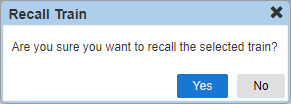
Click Yes in the confirmation dialog.
Click  to view the changes to the selected train visit.
N4 sets the visit phase as Complete and allows you to correct any erroneous data.